No Two Team Members Next to Each Other

1st JLTi Code Jam – Mar 2017

Input: 1, 1, 2, 2, 2, 567, 567, 10000076, 4, 2, 3, 3

Explanation: There are 12 people listed above. They belong to 6 teams (Team 1, Team 2, Team 3, Team 567, Team 10000076, and Team 4). As you can see people are identified in the list by the team number.

Output: 1, 2, 1, 2, 4, 2, 567, 3, 567, 100076, 2, 3

As you can see, the output has rearranged the team members in way that no two members from the same team standing next to each other.

Input: 1, 1, 1, 1, 2

Output: It is not possible to rearrange them.

Task: You have to write a program that can rearrange even billions of such team members belonging to millions of teams very fast. If the input is such that it is not possible to rearrange then the output should be: It is not possible to rearrange them. A correct solution is not sufficient. The algorithm has to be efficient, otherwise the output for big data 🙂 will not come.

GitHub: No Two Team Member Next to Each Other

Index

Company Tour 2017 to Noland

2nd JLTi Code Jam – Apr 2017

Input: Capacity = 125, w = [45, 25, 80, 100, 125]

Explanation: This year, RC has taken all JLT Asia employees to Noland for the company trip. As the name implies there is not much land in Noland, it is river everywhere. When we have to cross such a river having only one boat with a certain capacity (in the above example 125 Kg), Warren Downey, our Deputy CEO approaches RC and asks us to quickly divide the people so that each trip of the boat carries people exactly to its maximum capacity, 125 Kg in this example. He shows the example above and works out the below output that he desires.

Output: {45, 80}, {25, 100}, {120}

When RC team pointed out what would happen for a scenario when we have a case like Capacity = 120, w = [40, 20, 80, 100, 120, 70]. Warren informs us we always utilize our resources to its maximum capacity. No compromise. We will not cross the river and will change the tour itinerary.

Output: No crossing, change itinerary.

Task: When I woke up an hour ago from my afternoon nap with a lot of stress, I realized that the tour was just a bad dream. I started feeling relaxed. But the problem got into my head and now it is itching everywhere inside it. In this situation, I realize, I can spread the itching to my JLTi friends in Singapore and Mumbai as well.

You can imagine there is a boatman and his weight is out of consideration. The input capacity is only applicable for the passengers. The input w array is holding only the passenger weights. In short, you can ignore the boatman.

GitHub: Company Tour to Noland

Index

Dissecting Dates in the Context of C# MVC and Kendo Grid

The date in server

Recently, I wanted to send a date from server to client and in client a Kendo grid to show as it is without applying local time zone.

Let us try to understand date in server side in the world of C#. I have created a date using the below line. It is 1st April 2015 and tagging it as local date. When I say local date I mean the local date of the computer where this code is executing, that is the application server’s date. Obviously, the application server and browser can be located in two different time zones.

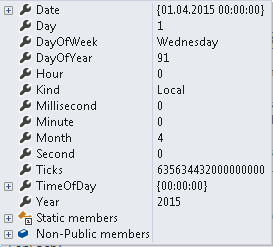
image001

image002

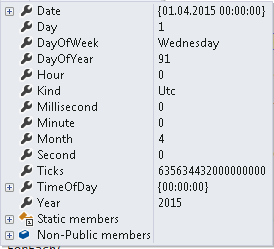
I could also say that the date is not local but UTC.

image003

image004

If we look at the two dates in details we see that both say it is 1st April 2015. We also see an important thing Ticks. This says the number of ticks since 0:00:00 UTC on 1st Jan, 0001. 1 millisecond = 10, 000 ticks.

This means no matter whether we say UTC or local the number of ticks remains the same till 1st April 2015 as long as we have a different attribute in C# DateTime object called Kind indicating what kind of date it is.

Apart from UTC and Local, there is a third Kind called Unspecified. If you are reading the date from say, database where the date read does not have any extra property for Kind it will be marked as Unspecified. Json would treat it as local Kind while creating a string. If you know that the date was indeed saved as UTC and if you want to mark it as a UTC date then the below function would do that without applying any time zone offset.

image005

The date in client

Now that we have a C# date object with its Kind property we would like to pass this all the way to client as a JSON string. Let us use the Json function.

image006

In client side, this is what we get for the first case where Kind property is local.

image007

It returns the number of milliseconds since 0:00:00 UTC 1st Jan 1970 (epoch), also called ticks. What is important is to note that the string has no trace of Kind. What does it mean? This only means that the Kind is hardwired here. And that is UTC.

By the way, did you notice two important things? First, we lost the precision beyond milliseconds. And second, how it supports a date less than 1970, by using negative values. The numbers (Ticks and ticks) are different in server and in client. This is because both the starting time and the unit are different.

Now that we have the number of milliseconds elapsed since epoch we can easily get the date, both in UTC and local time in client side. How it will be rendered depends on how we do things in client side.

If we have the freedom to convert the time then we can show it however we want. Let’s first create the JavaScript date object from the string.

image008

Now JavaScript date can support both UTC and local at once. The signature/value used to create the JavaScript object determines how the date will interpret the input. For example, in the above example, since we have initialized the date with number it will add that many milliseconds since epoch (UTC) and give a date. That date can be interpreted however we want.

image009

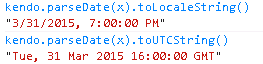
toString prints it in local time and toUTCString prints in UTC.

image010

Note that the UTC date is no longer 1st April 2015. It is reduced by 8 hours and went back to 31st Mar 2015. This is because from server we sent 1st April 2015 in local kind (Server in Singapore time zone that is +8).

We can as well use Kendo functions and the output will be like below. The toLocaleString gives 12:00:00 AM. There is nothing to worry about here. If the time component is absent then the function assumes 12 AM midnight, essentially means the first moment of that day.
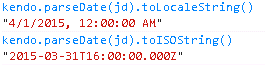
image011

You might wonder why both the local date of server and the local date at client are the same. Well this is because both server and client are in the same time zone (Singapore +8).

Let us move the browser to a different time zone. Say, in the middle of UTC and Singapore (+8) to Moscow (+4). See the difference in number of milliseconds, the local date (server date is reduced by 4 hours and it moves to the previous day 8 PM, 4 hours short of server/Singapore local time).

image012

image013

The UTC time is still the same. It makes sense since our application server is still in Singapore and is still passing 1st April 2015 local. But why the toLocaleString() giving 7 PM? Should it not give 8 PM? Yes, it should and internet explorer does give 8 PM. I did run a new instance of chrome after changing the time zone to Moscow. And why does it say 7 PM, I have no clue. Both were using kendo version 2014.1.318. Let’s not get distracted here. Just say, oops and move on.

Internet explorer shows the below for this case. In my understanding that is correct.
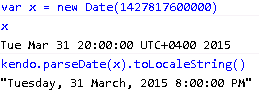
image014

Had we sent the same date with UTC Kind would this still be the same? The answer is no. The number of milliseconds since epoch (UTC) would have been different for the same date of UTC Kind. They would have looked like below:

image015

image016

Note that the number of milliseconds since epoch is different and the date in UTC shows 1st April 2015.

Showing the date in Kendo grid in client

Let us assume that we have some columns and some rows to show in Kendo grid that includes some date columns. Some of those date columns should show the dates in UTC while the rest in local time zone.

So we send all these data as JSON string to client side and assign that data source to Kendo grid. In Kendo we have defined some date columns using code like

Type: “Date”

By default Kendo Grid would show the date in local time zone. That means it is going to apply the time zone offset on the string representing UTC date. Apparently, there is no way to simply indicate in the column definition to show the date in UTC.

That leaves us with only one option and that is to nullify the adjustment. If the browser in UTC -01:00, the 1st Apr 2015 00:00:00 is going to be shown as 31st Mar 2015 23:00:00. That means the date is reduced by 1 hour. So to nullify this effect, we will add 1 hour.


image017

image018

So the end result is that whatever date we send from server will be shown as it is no matter where the browser is located.

Sending the date back to server

The same thing happens when the date comes back. The date user picks is treated as local (browser) date. When we use say, kendo.stringify (converts JavaScript object to JSON) to serialize it before sending it to server then the date is converted to UTC.

Suppose user picks 1st April 2015 from Moscow that looks like below:

image019

When it goes through kendo.stringify it looks like the below (4 hours reduced to make it UTC):

“2015-03-31T20:00:00.000Z”

So in server what we get is 31st Mar 2015 and not 1st April 2015. We lost where in the world this date came from (well, we can find it by some means but we are not talking about that here). So we cannot get back what user really chose.

Hence it is important that from client itself we nullify the serialization effect. We do this by adding 4 hours. Well we actually subtract the offset that is – 4 hours for Moscow. So when kendo.stringify converts the date to UTC during serialization it still remains 1st April 2015 and we get that in server.

“2015-04-01T00:00:00.000Z”

Is adjusting the offset enough?

Let us move our browser to Samoa that is 14 hours ahead from UTC (+14) during Local daylight saving time and UTC (+13) when day light saving time ends (on 5th April). 1st April 2015 would look like below:

image020

If we get the time zone offset using today’s (say 18th April 2015) date as done above it would be – 13 hours. If we do the same with 1st April 2015, we would get – 14 hours.

Kendo.stringify would use the specific day’s offset and not today’s to make it UTC. Hence we have to get the offset of the day that user chose. If we use today’s offset then the adjustment won’t be correct and in server we will get the wrong date/time.

At this moment, you might be wondering was it correct to use today’s offset to adjust the UTC date that we got from server before passing it to Kendo.

The answer is No. We have to use the offset of that date. However that is a little bit tricky. Why? Well, how would we know the date in local time? In client we got the UTC date. That is the right date. We got to use the JavaScript UTC functions related to Date like getUTCFullYear() etc. to extract the year, month and day. Then create a local JavaScript date with those components. Get the time zone offset from that date and use that to adjust.

That is too much!

Can we get rid of day light saving time issue altogether?

We can either choose to adjust the way above or we ignore it altogether. How? When user chooses 1st April 2015, let us add 12 hours to that and make it 1st April 2015 12:00:00 PM. Take today’s time zone offset to adjust and that way we ignore that day light saving time.

When the date ends up in server in UTC, we outright set the date to 12 noon again and save that. It is the same story when the date makes it journey to client. There also use only today’s offset. Since we have 12 hours buffer, few hours’ fluctuation might change the time but not the date.

You might be interested in knowing a little issue here: if user manually types the date in Kendo date picker with a date based format the time is lost. The time is retained if calendar is used to input the same.

A few words on JSON date

We have seen two kinds of JSON dates:

image007

“2015-04-01T00:00:00.000Z”

They are Microsoft’s ASP.NET built-in JSON format and ISO 8601 format respectively. Both would be treated the same way by Kendo. However the former is compatible with most browsers, especially the old ones.

Is this the right approach?

Well, adjusting the date in client side may not look good. It is not bad either. This is what Kendo is suggesting: adjust it at requestEnd function.

One way to handle this is to send string to client instead of date. However when Kendo would show them and we try to sort them the sorting will be based on the strings, not dates.

Another approach is to adjust the time zone offset in server side. When client request it for it let it pass the offset to it.

The best way would have been a flag while defining the Kendo column, especially in our case while the columns are dynamically decided, some of which would be dates, among them few would be in UTC and the rest in Local.

Index

MS SQL Server Data (Table) Storage

What does MS SQL Server store?

MS SQL Server has data files and (transactional) log files.

How is the log file organized?

Log files contain a series of log records, not divided by pages.

How is the data file organized?

Data files are grouped by extent and each extent by pages. Every page belongs to an extent.

What is page and extent?

Each page is 8 KB (128 pages/MB) and 8 contiguous pages make an extent of 64KB (16 extent/MB).

Disk I/O is performed at page level. That means, the minimum SQL server would read/write at one go is a page ~ 8KB.

MS SQL Server can also read a whole extent at one go instead of reading a single page when it makes sense. Look out for partition alignment so that reading one extent does not end up touching two disk blocks, affecting performance.

What are the different types of pages and what do they store?

Each page starts with a 96-byte header that stores information about the page including page number, page type etc.

Page types include Data, Index, Text/Image, Page Free Space (PFS, information about page allocation/free pages), Global Allocation Map (GAM, extent allocation information), Shared Global Allocation Map (SGAM, mixed extent with at least one unused page information), Bulk Changed Map (information about extents that got changed by a bulk logged operation since last BACKUP LOG statement) Differential Changed Map (information about extents that got changed since last BACKUP DATABASE statement), Index allocation map (IAM, page/extent allocation for an object, say a heap of a table).

So basically, pages store data and metadata for the MS SQL Server to make efficient use of them for various I/O (related) operations.

What are the different types of extents?

There are two types of extents: uniform and mixed extent. When a table is created instead of allocating a whole extent (8 pages), a single page (a page from a mixed extent type) is allocated. This goes on until the table crosses 8-page size. Onwards, every time a whole extent (uniform extent type) is allocated.

IAM pages (come from a mixed extent) keep track of these allocations.

Where does my table data go?

First of all, a table can have partitions. Let’s say we have not partitioned a table. Then we have just one partition. By the way, partition resides in a single file group.

Table can have a clustered index or not. If clustered index then the data organization type is B-tree else Heap (no logical order of data). It can be mentioned here that nonclustered index has same b-tree structure with the difference that it does not have data pages. Rather, it has index pages containing index rows, each having a row locator pointing to a data row in the clustered index or heap. Heap or b-tree of a partition can have up to 3 allocations units.

What is an allocation unit?

Allocation unit is a collection of pages within a heap or B-tree. We have three different types of allocation units based on the kind of data they would store. They are:

  1. IN_ROW_DATA: for data (data page) or index (index page) rows, can save all but LOB.
  1. LOB_DATA: for text, ntext, image, xml, varchar (max), nvarchar (max), varbinary (max) data types. Uses Text/Image pages.
  1. ROW_OVERFLOW_DATA: for variable length data stored in varchar, nvarchar, varbinary, or sql_variant columns that exceed the 8060 byte row size limit. Uses Text/Image pages.

How are the data rows saved in a data page?

We are talking about data pages (used by both heap and b-tree to store data rows and not index rows) in IN_ROW_DATA allocation unit. They are saved serially starting from the end of 96-byte header, not necessarily in the logical order as dictated by a clustered index, if any. It is the row offset table that maintains the logical order.

What is row offset table?

For each data row there is a 2-byte entry, saving the offset. It tells from where the data row starts. The entry for the first data row (logical, not physical) is there at the very end of the page. Suppose the data page contains 20 rows. Then there will be 20 entries and these entries make a row offset table. The first (0th) entry would say where the first logical data row would start. The physical position of this might be somewhere in the middle of the page and not necessarily at the beginning meaning just after the header.

What is the maximum data size in a data page?

Maximum data and overhead size in a data page is 8060 bytes.

How to save a row bigger than 8060 bytes?

A table can contain maximum 8060 bytes per row. Unless it has a variable type column defined. It would then use a 24-byte pointer in data page to point a Text/Image page in ROW_OVERFLOW_DATA allocation unit where they would move the data, starting with the largest width column. Data of a single variable column must not exceed 8000 bytes but combined width can exceed 8060 bytes. However, if a row is less than 8060 bytes and there is no space in the page then page split – not a row-overflow will occur.

A variable column value must be completely in-row or completely out-row. Multiple such columns can spread over several pages in ROW_OVERFLOW_DATA allocation unit. Such Text/Image pages are managed by a chain of IAM pages. Note that, the index key of a clustered index cannot contain varchar columns that have existing data in the ROW_OVERFLOW_DATA allocation unit.

How to save single column data bigger than 8000 bytes?

LOB column can store up to 2 GB data. Whether at attempt to save the data in-row would take place depends on the settings. If saved out-row, a 16-byte pointer from data page for each LOB column would point to the initial Text/Image page in LOB_DATA allocation unit. A page in LOB_DATA can store multiple columns from multiple rows but for a single table. Text/Image pages storing LOB data are managed by a chain of IAM pages.

Index

MS SQL Server Nvarchar Issues

Do you need to store non-English characters, like Chinese characters?

Then you need UNICODE characters. nvarchar, ntext, nchar are your options. n is for ISO synonym national. Uses UNICODE UCS-2 character set, 2 bytes for a character, double than that of char/varchar/text. This is a price you need to pay for multi-ligual support.

nchar or nvarchar/ntext?

If you know the data length is always going to be around a fixed size, say, 20 characters then nchar, else nvarchar/ntext.

nvarchar ($fixed size$) or nvarchar (max)/ntext?

If you know your data is always going to be somewhere between a fixed range, say, 1 to 100 characters and would never exceed 100 then nvarchar (100). It makes sense, looks good. Use fixed length nvarchar as long the size you know would be less than 8000 bytes. More than 8K means the data would be saved out-row. Fixed length nvarchar can’t help.

If your data size can be NULL to 2 GB and anything in between then you have no option but nvarchar (max)/ntext.

nvarchar (max) or ntext?

Go for nvarchar (max), not ntext. ntext will not be supported in future and nvarchar (max) better in performance than ntext.

Is nvarchar (max) bad for performance?

SELECT 
[name] AS tablename, 
large_value_types_out_of_row 
FROM sys.tables

If large_value_types_out_of_row for the table that contains your nvarchar (max) column is 0 (=OFF) then MS SQL Server would try to save the data in-row, given that the row fits in 8K page size. If the row does not fit in 8K then the nvarchar (max) data would go out-row, one or more extra pages depending on the nvarchar (max) column data size.

If MS SQL Server has to read extra pages for a row, performance would suffer. But what to do? The data is big, right?

If large_value_types_out_of_row is 1 (=ON), then no matter how small is your nvarchar (max) column data, it will always be saved out-row.

In-row or out-row?

If the select statements you use for the table excludes the nvarchar (max) columns then use out-row. Because when you will be reading the non-nvarchar (max) columns, you are not reading the other pages used to store long nvarchar (max). Not only that, since all those big data are not in the same page, your single page can now fit more rows with the small data. You will be doing good here.

But if you have to read the whole row (all columns) at one go, then in-row good.

How to change in-row to out-row and vice versa?

You can change anytime.

sp_tableoption N'MyTableName', 'large value types out of row', 'ON'

However, doing so won’t immediately change the existing data layout. New inserted data would follow the new way. Existing data, if updated would be saved in the new layout. Well, you can always read the existing data, change it and then update it again with the old value. That way, you save all your data in the new layout.

What about ntext?

Well, we already decided not to use next. But since we are discussing this let’s see the respective issues.

This is how you can know the existing layout.

SELECT 
[name] AS tablename, 
text_in_row_limit 
FROM sys.tables

text_in_row_limit = 0 says, the option is not set. If non-zero, say, 256 then that is the number of bytes that will be saved in-row.

This is how to change it.

sp_tableoption N'MyTableName', 'text in row', ON

text_in_row_limit would be 256.

sp_tableoption N'MyTableName', 'text in row', '1000'

If you want that limit to be 1000 bytes. Yes, setting itself won’t change the existing data layout just like nvarchar.

How full are the pages?

Remember, you pages should be full as much as possible. Otherwise you will be reading a page but get very small data. You will be doing bad.

SELECT 
page_count, 
avg_page_space_used_in_percent 
FROM sys.dm_db_index_physical_stats(DB_ID(N'MyDatabaseName'), 
                                    OBJECT_ID(N'MyTableName'), 
                                    NULL, NULL, 'DETAILED')

But ignore small tables having less than 1000 pages (page_count).

Are the rows fitting in 8K?

SELECT 
OBJECT_NAME(object_id) as TableName, 
OBJECT_NAME(index_id) as IndexName, 
min_record_size_in_bytes, 
max_record_size_in_bytes, 
avg_record_size_in_bytes 
FROM sys.dm_db_index_physical_stats(DB_ID(N'MyDatabaseName'), 
                                    OBJECT_ID(N'MyTableName'), 
                                    NULL, NULL, 'DETAILED')

It is better to design tables in way so that data of n (n >= 1) rows fit in 8K, a page.

Is there any other limitation for nvarchar (max)?

You cannot create an index on nvarchar (max) column.

Also avoid using nvarchar (max) column in where clause.

What are the issues for migrating varchar to nvarchar?

Your migrated data is going to be double. Some rows might no longer fit in-row. They may over flow to out-row. Performance might be affected.

Index

MS SQL Server Recovery Model

Recovery model

A recovery model is a database property that controls how transactions are logged. Backup and restore operations occur within the context of the recovery model of the database.

Why log transactions?

To guarantee ACID properties over crashes or hardware failures every action is logged (to disk). In case of system failure, it would read the log and redo/undo the logged actions to bring the database to a consistent state.

Where it is logged?

MS SQL Server maintains mainly two kinds of files. Data file and log file. Log file can map to one or more physical files. Also note that transactional log is different from other logs like setup log, error log, profiler log, agent log, event log etc.

Types of recovery model

Depending on how extensively MS SQL Server logs there are 3 types of recovery models. They are:

  1. Simple recovery model
  2. Full recovery model
  3. Bulked logged recovery model

Simple recovery model

Suppose every day you take a backup of the database. If there is a failure, you at most lose the data for one day and you can afford that. In that case, you can choose simple recovery model. Here, every transaction is logged. However, as soon as those transactions are written to disk (checkpoint), the log is discarded.

Here you don’t have the provision to take back up for log. You only backup data. And as said before, in case of failure, you can recover the data that you backed up last time. You loose everything else, done since the data backup.

You get rid of the administrative task of taking the log backup. You get rid of running into the risk of managing very large log files.

However you lose the following features:

Log shipping – This is a disaster recovery technique where the transactional log is copied from primary (production) database on a primary server (the production MS SQL Server instance) to one or more secondary database (warm backup of primary database) on separate secondary server instance (where warm standby copy/copies is/are stored). This feature works with the help of full recovery model that will be discussed a bit later.

AlwaysOn or Database mirroring – These features support/create fail-over environment using redundancy. If the primary database fails, the secondary (not backups) database takes over. These features also work with the help full recovery model.

Media recovery without data loss – If media (tape/disk) fails recovery without data loss not possible. It needs full recovery model.

Point-in-time restores – You cannot restore the database to any arbitrary point defined by a date and time. For this to work, you need full recover model.

Full recovery model

By this time, it is clear that for the features above to work you need full recovery model. Well, it will log all the transactions from the beginning even if those transactions are written from memory to disk. So it is obvious that the log size will be too big. It means there is provision to take log backups. And that you have to take log backup regularly else you might run out of production server disk space. Yes, if you backup log then the backed-up up log will be removed from the database log file.

Armed with full recovery model (with the pain of administrating transactional log) you won’t lose any data due to a lost or damaged data file. You can restore database to any point of time.

Unless the tail of transactional log file is damaged all is good. Else you lose the data since last time you took a log backup.

Bulk recovery model

Same as full recovery model just that for the bulk operations (to be precise, a set of operations those can be minimally logged) it does not log everything. This model allows bulk copy to work with high performance by not logging all transactions.

Point-in-time recovery not supported. Recovery possible to the end of any (data and log) backup.

If log is damaged or bulk logged operations occurred since the most recent log backup, changes since the last backup will be lost. Else no data is lost.

Why log size too big?

This is a typical problem people face.

You can check log_reuse_wait_desc column in sys.databases. It will tell you why?

However, most likely the database is using the default full recovery model. You are unaware of it: especially, if the database is created by SharePoint. And you forgot to take regular log backup.

Reference

Index

Heartbleed Bug

Let us start by HTTP

When we are browsing internet by typing a web address (URL/Server address) in a browser (client) starting with http we are using HTTP protocol. It functions as a request-response protocol in a client server model. That means client (say, browser) sends a request and server sends back a response. Note that browser is just one type of client. And a client is not necessarily has to be a browser.

HTTP is built over TCP

HTTP protocol is implemented at the top of a reliable transport layer protocol, mostly TCP.

HTTP has security problem

However an attacker can sit on the line between the client and the server and can read what has been transpired between the two. Not only that, an attacker can impersonate a server, i.e., act as if it is the server and can collect all client information that might be sensitive to be revealed.

There comes TLS/SSL to build HTTPS

Hence it is important to make sure that client is talking to the real server. It is also important that all communication between the client and the server is kept secret between the two. TLS/SSL comes into picture here. It implements transport layer security to protect the HTTP line and then the HTTP is called HTTPS. When you are typing a URL starting with https you are using a secured HTTP line.

TLS/SSL uses asymmetric encryption

Asymmetric encryption also known as public-key cryptography uses a key pair; a private key and a public key. The private key remains known only to the server while the public key is open/known to all. Data can be encrypted by any of the two keys. And then only the other key can decrypt that.

There are two things in public-key cryptography:

·      Public key encryption – public key encrypts, private key decrypts

·      Digital signature – private key encrypts, public key decrypts

When a server gets a certificate (X.509) from a certificate authority (CA), it essentially generates/gets a key pair. Then the certificate contains the public key of the website and a signature of the CA (i.e., signed by the private key of the CA) that issued the certificate among other identity information. When browser talks to a website, the website has to first provide its certificate.

Browser has a list of trusted CAs and their public keys. Browser can use the right CA’s (as mentioned in the certificate) public key to verify the certificate (signature).

And symmetric encryption

Now that client trust’s the website, it uses the public key of the website to encrypt a key that it would like to use as the symmetric key for further communication. Well, in reality there can be a number of steps here that essentially decides how the symmetric key to be generated/negotiated/used. Typically a disposable session key is generated from an initially (at the beginning of secure line creation) generated master secret to implement forward secrecy. That means, even if at any point the session key is compromised, only the data transferred using that session key will be compromised. But the attacker won’t be able to figure out the next session key that will be generated after a while.

Unlike asymmetric key where any of the two private and public key can encrypt data that only the other key can decrypt, in symmetric encryption it is a single key that does both the encryption and decryption. Symmetric encryption is better for performance, key distribution and helps to implement forward secrecy by continuously changing session keys.

Here comes OpenSSL

So if you want a server that would support TLS/SSL support you need a component to implement that. OpenSSL is such an open source implementation. There are many other implementations like GnuTLS etc.

But TCP has an issue

So now we have an HTTPS connection built over TCP where client is sending a request and server is giving back a response. But how long would the client wait for the server to respond? At times we do need to wait in a blocking call till the response comes back. But then at times TCP can fail to detect whether the other side is still alive. Especially, if the other side closes the connection without following a normal tear down process.

Also at times, firewalls sitting on the line close idle TCP connection.

Here comes heartbeat

To make sure client is not waiting for a response to come from a server sitting on the other side of a closed connection. And to make sure firewalls are not closing the connection when it is idle, a packet is periodically being sent to server. And the server sends back a response.

OpenSSL’s heartbeat implementation went wrong

OpenSSL’s hearbeat implementation went wrong and this bug was introduced in 2012. The buggy code could read up to around 64KB memory of the server process and send that back to client as each heartbeat response. Client could construct the message in a way that could to some extent dictate where/how much it wants to read from server. That would it turn allow the client to steal some sensitive information to exploit.

How to exploit Heartbleed bug?

A client as said need not be a browser. Rather one could write one’s own HTTPS client and construct the heartbeat message on his/her own. By using multiple and especially simultaneous heartbeat messages one can accumulate a large section of memory of the server process. After analysing the data one can possibly even get the server’s private key. If the server belongs to a e-commerce site one could possibly get the credit card information, user ids and passwords of the users who were using that site that time.

Affected areas

Even though as of now we were mostly focused on web servers it is not the only thing that gets affected. OpenSSL (heartbeat extension) is also used in email server, VPN and other TLS/SSL secured client server systems. Also it is not only the server but the client as well that can be affected.

Solution

There are few sites like ssllabs where one can paste the URL and check whether it is vulnerable. OpenSSL already released a fixed version. If you own a server that is vulnerable it is better to assume that it has been compromised. It is then best to change the certificate. If you are using a server where you have an Id and password, it is better to change your password.

Index

FILESTREAM – Considerations, Restrictions and Limitations

There are considerations, restrictions and limitations to use FILESTREAM. They are listed below:

Works as it is or with some considerations

  1. SQL Server Integration Service (SSIS) – uses DT_IMAGE SSIS, can use import and export column transformation
  2. Log Shipping – supports – both primary and secondary servers must run MS SQL Server 2008 or above
  3. SQL Server Express – supports
  4. Full Text Indexing – works if there is an additional column in the table with filename extension for each BLOB
  5. Failover clustering – FILESTREAM filegroup must be on a shared disk, enable FILESTREAM on each node hosting FILESTREAM instance

Limited work

  1. Replication – use NEWSEQUENTIALID(), Merge Replication synchronization over https using Web Synchronization has 50 MB limit
  2. Distributed Queries and Linked Server – can not use PathName() for four part name
  3. Contained Database – requires extra configuration outside database, hence not fully contained

Does not work

  1. Transparent Data Encryption (TDE) – does not work
  2. Database Snapshots – does not work with FILESTREAM filegroups
  3. Database Mirroring – does not support

Reference

Prev

Index

Cashier’s Order from DBS online banking

Recently I needed to pay some fees to some authorities. In Singapore, typically you pay somebody by cash, ATM transfer, online transfer, NETS etc. However there are cases when you need to pay by cheque. It was such a case. But if you are having savings accounts with the banks they are unlikely to give you a cheque book. Cashier’s order (CO) comes handy as an alternative to cheque. Especially, if you want to avoid all the hassles and fees (small though) to open a current account that provides you with a cheque book.

You can either go down to a branch, fill out a form, pay a fee and collect a CO. However some banks like DBS allows you to apply online for a CO. If you do so, you still need to go to a branch (only certain branches – Jurong Point is one of them, you can chose one while applying online) to collect it (last time I did not need to wait in a queue, a front desk lady collected it from inside and gave it to me) but you save the fee. You can also choose the bank to send it to you by post.

When I tried to apply for a CO online I found I can do so for up to SGD 10,000. I needed more. Without finding a way I went down to the branch and was informed that I can do as many as possible. If the payee is the same they would call me and give an aggregate one (I needed a single one). Had they mentioned it here it would have been better.

By this time I became more careful. When I was issuing the COs one by one I was keeping the references manually as there was no report or anything to figure out how many I have issued so far. Well, I could log out and during that time they indeed show all activities I did in that session.

Overall, DBS provides a nice online experience. Especially I like the e-statement that saves paper.

PS. Last time, I bought a CO of S$ 35. However, I could not manage time to collect it. They called me to collect it. When I said I would not require it anymore, they canceled it, free of cost!

Index